

fee
Kabayan Remit website design

Maximize your padala!

Send love with Kabayan Remit

Download on Apple StoreGet the app in Google Play
 
  • United Kingdom
  • Canada
Credit to account
  • Bills payment
  • Cash collection
  • Credit to account
  • Mobile e-wallet top-up
Online bank transfer
  • Fast and easy transfer Send money using your debit card
  • Low cost transfer
  • ACH Transfer
We send
Recipient gets
Save up to

Exchange rate

£1 = ₱

Transfer fee

£

You pay

£

Send money
Ruffa

The best service for Kabayans!

We offer a fast, secure, and convenient online money transfer service designed for Filipino remitters, making it easier to support your loved ones in the Philippines.

Kabayan Remit Registration Guidance

1. Sign up for FREE

Join us in just a few taps – quick, simple, and all from the app.

Kabayan Remit Add Beneficiary

2. Add your receiver

Save your receiver’s details to make future transfers quicker and easier.

Kabayan Remit Send Money Remie

3. Send your padala

Enjoy high exchange rates, low fees and earn rewards with every transaction!

Delivery methods

Choose the best way to get your money delivered.

Credit to account Remie

Credit to bank account

Send money to any major Philippine bank account, hassle-free.

Cash collection Remie

Cash collection

Transfer funds to over 10,000 cash pick-up locations in the Philippines.

Mobile e-wallet Remie

Mobile e-wallet top-up

Conveniently top up e-wallets like GCash, Maya, and many more.

Bills Payments Remie

Bills payment

Never miss a due date! Pay your contributions and bills with ease.

Rewards Program

Sending love, made more rewarding - Earn points, claim discounts, and get a chance to win bigger prizes with every transaction!

circle

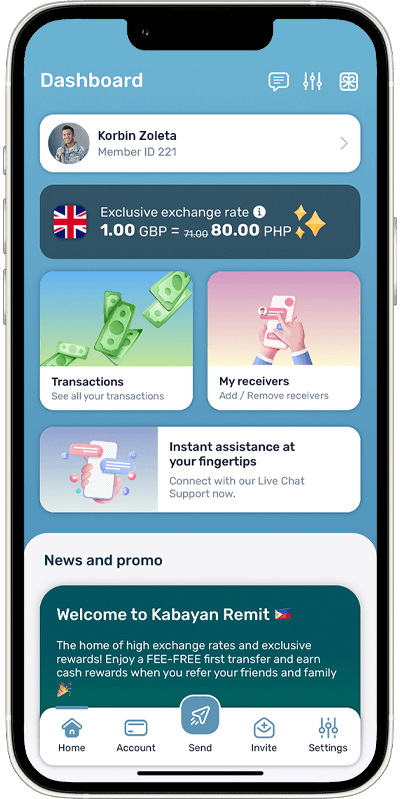
Send money to the Philippines on the go with our smart app

Save time when you send money. Download our mobile app.

  • Check the exchange rates in real time
  • Send money anytime, anywhere 24/7
  • Track the status of your payment
  • Earn rewards points and discounts
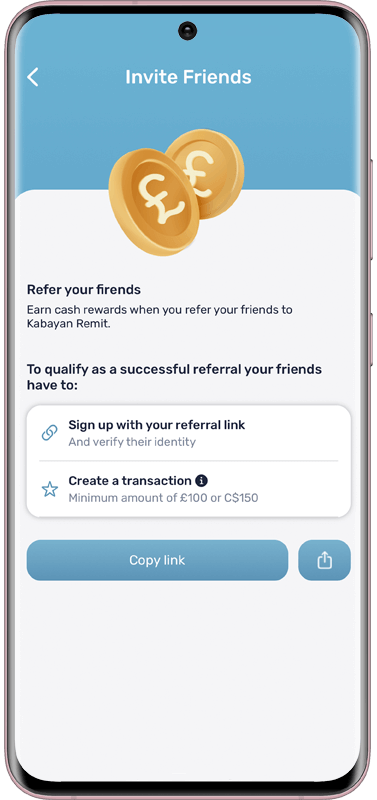
  • Earn wallet credits for referring friends

Choose the best way to send money to the Philippines

Send money Remie

Transferring money to the Philippines should be quick, safe and convenient. We understand that time and accessibility are essential when choosing a money transfer service. That’s why we made remittances to the Philippines as easy and convenient as possible by providing you with different ways to send your money, how your beneficiary can collect it, and how long it would take for your funds to be credited.

Payment Methods

  • Debit Card (UK & US)
    Paying for your transaction when you send money to the Philippines with a debit card is straightforward. Upon payment, enter your card details and ensure that all information is correct and that the name on your debit card matches your account name on Kabayan Remit. However, it is essential to consider that on a single transaction paid by debit card, you can only send up to £5,000 in the UK and US$300 in the US. Please note we currently don’t accept debit card payments for transactions originating in Canada.
  • Pay by Bank App (UK)
    Paying for your transaction using Pay by Bank App is quick and convenient. When sending money to the Philippines, select ‘Pay by Bank App’ as your payment method. You’ll then be redirected to your bank’s app or online banking to securely authorise your payment — no need to leave the Kabayan Remit app. Once approved, your transfer is processed instantly, giving you a faster and smoother way to complete your padala. Please note that Pay by Bank App is currently available for transactions originating in the UK only.
  • Apple Pay and Google Pay (UK)
    Kabayans in the UK can now use digital wallets, Apple Pay and Google Pay, to pay for transactions. When sending money to the Philippines, iOS users can select Apple Pay and Android users can select Google Pay as their payment method. Please note that Apple Pay and Google Pay are not yet available in Canada and the USA.
  • Online Bank Transfer (UK)
    In the UK, you can send up to £5,000 for only £2.99 if you pay by online bank transfer. To make the payment, you will need to access your online or mobile banking and transfer the total amount to Kabayan Remit’s bank account’s details below. When paying by online bank transfer, there is a maximum limit of £5,000 on a single transaction.
    Account Name: Kabayan Capital Ltd
    Account Number: 10135222
    Sort Code: 04-30-30
    Please enter your name as the payment reference.
  • e-Transfer (Canada)
    In Canada, you can send up to C$3,000 (exclusive of fees) through e-Transfer. Though the exact steps to make a payment may vary from one bank to another, it will always be straightforward. You will simply need to access your online or mobile banking, go to the e-Transfer section, and follow the instructions onscreen.

Delivery Methods

  • Credit to Account
    You can make direct payments to your beneficiary’s bank account. It’s the fastest and most efficient way to get your money delivered, as it’s all done online. The funds are usually credited to the receiver’s bank account within an hour after confirmation of payment.
  • Cash Collection
    You can also send cash to your family and friends in the Philippines within an hour. Your beneficiary can pick up cash from over 11,000 outlets in the Philippines. However, please note that there is a limit of Php 100,000 for this delivery method.
  • Mobile E-wallet Top-up
    You can top up your loved ones’ GCash, Maya, GrabPay, ShopeePay, or LazPay e-wallets. You will only need to provide the mobile number registered to your beneficiary’s e-wallet account. For most payment methods, the money is delivered instantly once payment is confirmed
  • Bills Payment
    You can also pay your Philippine bills online through Kabayan Remit. We accept payment for over 100 merchants, from Philippine contributions to monthly bills, and many more. Click here for the complete list of our partner merchants.

Our partners

Send money to the Philippines directly to Metrobank, RCBC, BPI, BDO, PNB, Landbank or any other Philippine bank or cash collection outlets.

97% of reviewers recommend Kabayan Remit from over 21,000 reviews.

Here’s why thousands of our customers use our transfer money service.

Good service thank you

Anonymous

24th January 2026

fast and reliable

Sharon

23rd January 2026

very satisfactory , excellent setvice

Mary

20th January 2026

Higher rate compared to other competitors.

Benjamin

19th January 2026

Reliable and fast

Anonymous

17th January 2026

Good service friendly staffs easy to contact

CHARITY

15th January 2026

Affordable and nice to hear that its possible to pay my sss

Rowena

12th January 2026

Good customer service

Anonymous

12th January 2026

It very easy-to-use kabayan remit canada and good exchange rate

Evangeline

8th January 2026

Average 4.79 stars

Reviews 22481

FAQs

Everything you need to know about sending money to the Philippines with Kabayan Remit.

You can send money online through the Kabayan Remit website or mobile app. All you need to do is register and create an account to start sending money on-the-go 24/7.


We provide a variety of payment and delivery options, so you can choose the most suitable way for you to transfer money to the Philippines from the UK, Canada and the US.


Depending on the country you are in, you can pay for your transaction through any of the following options:

  • Debit card (UK and US)
  • Online bank transfer (UK)
  • Pay by Bank App (UK)
  • Apple Pay and Google Pay (UK)
  • e-Transfer (Canada)

You can also select the most convenient way for your beneficiary to receive the funds, as we offer the following delivery methods:

  • Credit to account – transfer money directly to your beneficiary’s Philippine bank account
  • Cash collection – send money to any cash pick-up outlet in Luzon, Visayas and Mindanao
  • Mobile e-wallet top-up – send funds directly to your loved ones’ GCash or Paymaya e-wallet account
  • Bills Payment – settle contributions and bills with a wide network of Philippine billers.

After payment confirmation, Kabayan Remit can usually deliver your money to the Philippines within an hour for most payment methods.

Yes, we are an authorised Money Service Business (MSB) regulated by the Financial Conduct Authority (FCA) in the UK and the Financial Transactions and Reports Analysis Centre of Canada (FINTRAC) in Canada. We are also licensed as a money transmitter in select US States. Delivering your hard-earned money to your loved ones safely and securely is our number one priority. Our world-class compliance policies and cutting-edge technology provide added protection to ensure your details and transactions are secure.

Yes, you can send money to over 11,000 cash pick-up locations across the Philippines. It’s a fast and convenient option if your beneficiary does not have a bank account or if they prefer to collect cash in an instant. Our payout partners include Metrobank, PSBank, LBC, Cebuana Lhuillier, MLhuillier, Palawan Pawnshop, Robinsons Department Store, Pera Hub, RD Pawnshop and Villarica.

Yes, you can send funds directly to your beneficiary’s bank account in the Philippines. Once your account is set up, you will only need to provide their bank details when you create a new beneficiary.

If you’re sending money with Kabayan Remit for the first time, your transaction fee is FREE. After your first send, your transaction fee will depend on your chosen payment and delivery method. Transaction fees start at £2.99 for the UK, US$2.99 for the US, and C$3.99 for Canada. You can also check the total cost by entering the amount you wish to send into the calculator tool.

Sending money online is quick and easy with Kabayan Remit. Just follow this simple guide:

  1. Sign up for free on our website or mobile app (for iOS or Android).
  2. Verify your account after signing up to access your dashboard.
  3. From the dashboard, tap Send.
  4. Choose your delivery method, payment method, and enter the amount you wish to send.
  5. Add or select your beneficiary and select the purpose of transfer.
  6. Review your transaction details and complete the payment.

That’s it! Delivery usually takes under an hour once payment is confirmed.